Internal Audit Preparation
This document is a living guide for preparing systems, records, and related documentation for an internal audit.
It outlines the initial criteria and the relevant supporting documents to be prepared before the audit. This list is not exhaustive — additional requirements may be added depending on the system’s scope, applicable regulations, and institutional policies.
The ultimate goal is to establish a repeatable and consistent process that ensures audit preparation is carried out efficiently and effectively across all audit cycles.
Audit Preparation Criteria
To ensure a smooth and successful internal audit, certain IT and operational controls must be in place and well-documented. The following criteria outline the key areas that should be reviewed and maintained to demonstrate compliance, readiness, and best practices in IT governance.
-
Access Controls Are in Place
Access to systems and data should be restricted based on user roles and responsibilities. Accounts must be regularly reviewed for accuracy, unnecessary accounts removed, and multi-factor authentication (MFA) enabled where applicable. -
IT Asset Inventory Is Maintained and Updated
A complete record of all IT assets, including hardware, software, and licenses, must be maintained and updated whenever changes occur. Each asset should have an identified owner or custodian to ensure accountability. -
Network Infrastructure Is Documented and Maintained
Updated diagrams and documentation for LAN, WLAN, and server setups should be available. Network configurations must be backed up securely, and any changes should follow an established change management process. -
Data Backup and Recovery Mechanisms Exist
Regular data backups must be performed according to policy, with periodic restoration tests to verify usability. Offsite or cloud-based storage should be used to support disaster recovery and business continuity. -
ITSO Concerns Are Resolved Within Established Timeframes
All IT Systems Office (ITSO) tickets should be addressed promptly in line with Service Level Agreements (SLAs). Unresolved or high-priority issues must be escalated to prevent operational delays.
Access Controls Are in Place
Access controls ensure that only authorized individuals can access systems, data, and facilities. Proper documentation and enforcement of these controls help safeguard institutional information and support audit compliance. The following items should be prepared:
- Access Control Policy (university-wide or department-specific) TSO
A formal document defining the rules and guidelines for granting, managing, and revoking access to systems and facilities. It should be approved by management and regularly reviewed.
- IT Security Policy (aligned with DICT or ISO/IEC 27001 guidelines) TSO
A comprehensive policy outlining security measures, acceptable use, and responsibilities. It should align with recognized standards such as DICT policies or ISO/IEC 27001.
- User Account Request and Authorization Forms HRD
Signed forms from department heads or supervisors approving the creation, modification, or removal of user accounts. These serve as proof that access rights are granted with proper authority.
- Role-Based Access Control (RBAC) Matrix ITSO
A mapping of job roles to the systems and permissions they require. This ensures users only have access to the resources necessary for their role.
To export RBAC Matrix from NUIS
STEP 1. Log in to NUIS using a System Administrator account.
STEP 2. Go to Administrator > User Roles.
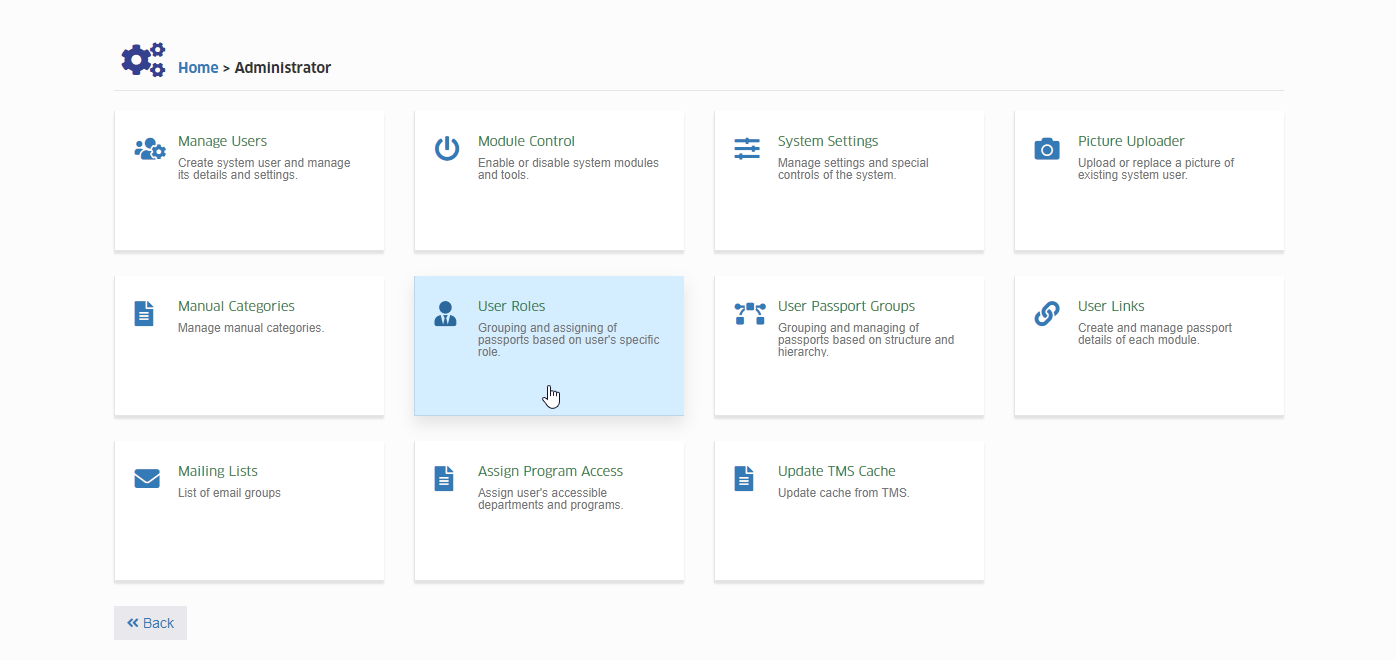
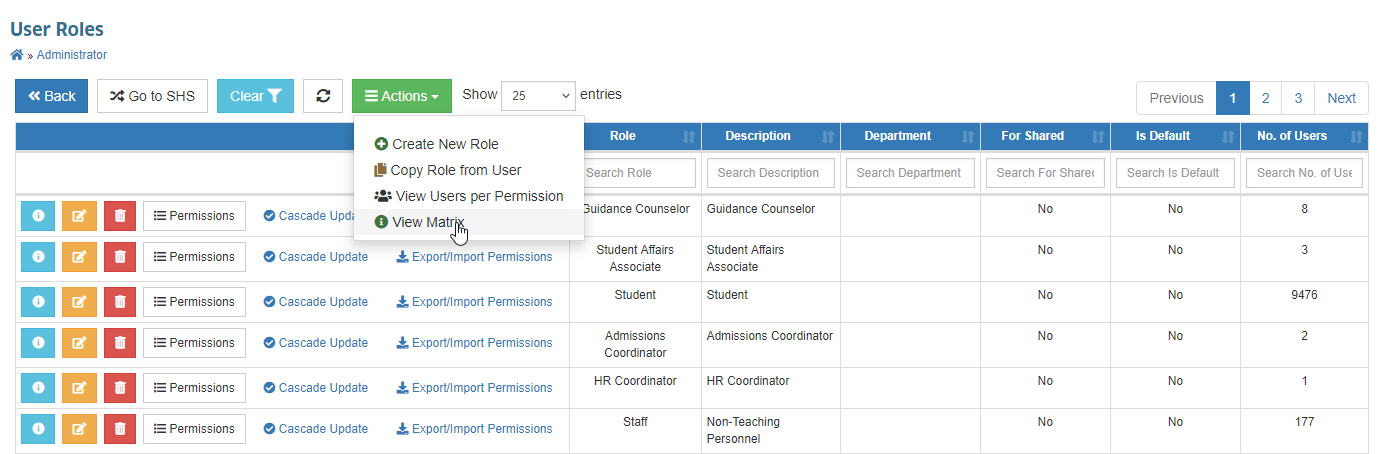
STEP 3. In the Actions dropdown button above the table, click View Matrix.
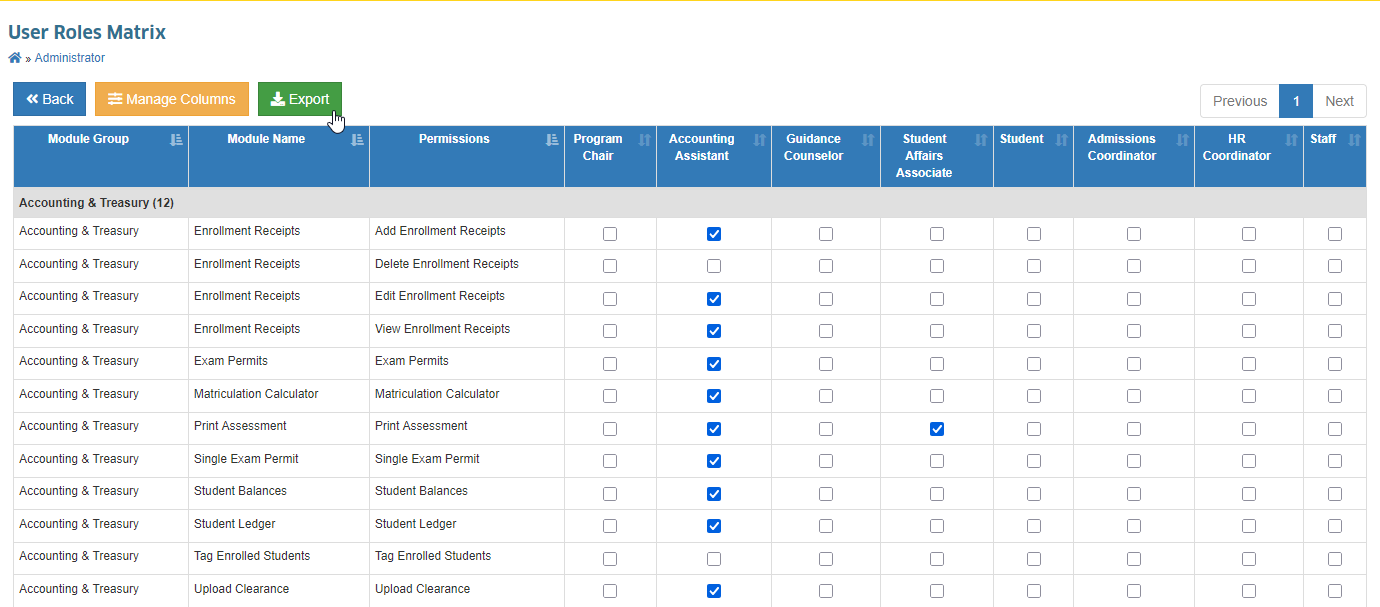
STEP 4. You will be redirected to the User Roles Matrix page.
STEP 5. Click the Export button to download the RBAC matrix file.
To export NUIS-SHS roles, follow the instructions similar to NUIS.
- User Account and Role Assignments ITSO
A current list of all system users along with their assigned roles and access privileges. This should match the RBAC matrix and be regularly updated.
This section describes how to retrieve the list of users and their assigned roles directly from the system’s user management interface.
STEP 1. Log in to NUIS using a System Administrator account.
STEP 2. Go to Administrator > Manage Users.
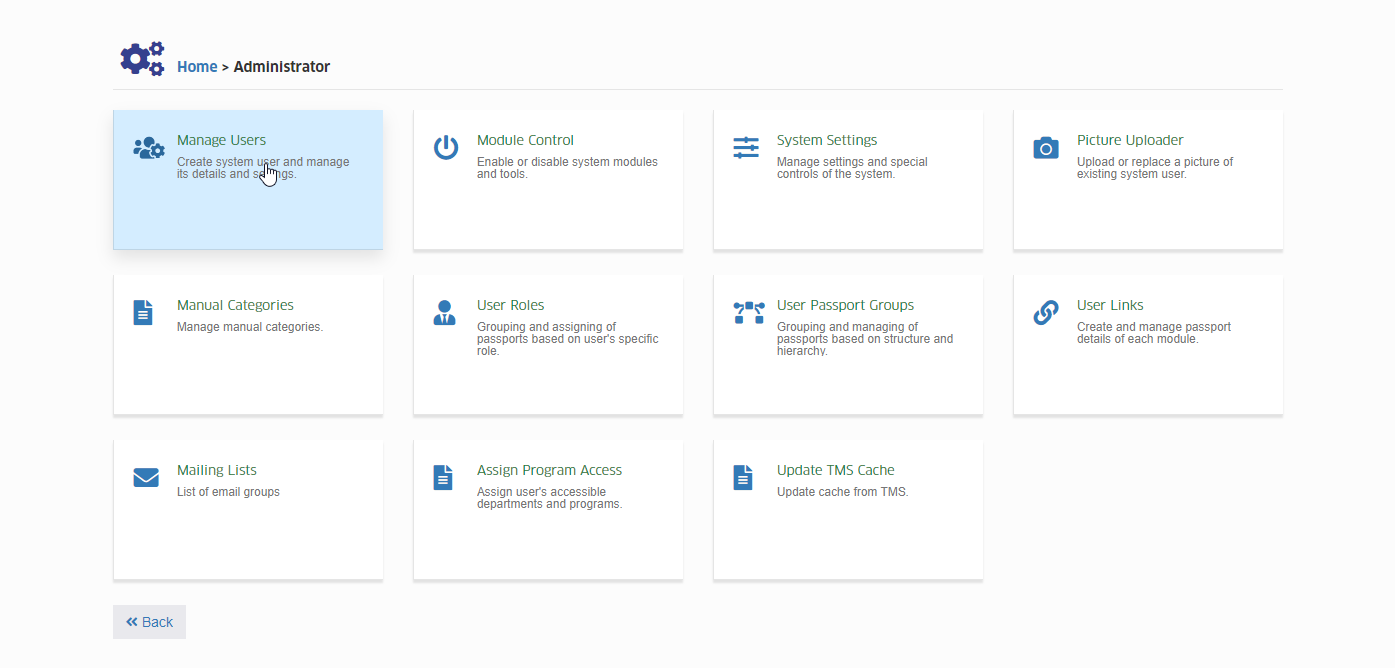
STEP 3. In the Actions dropdown button, click Export Data.
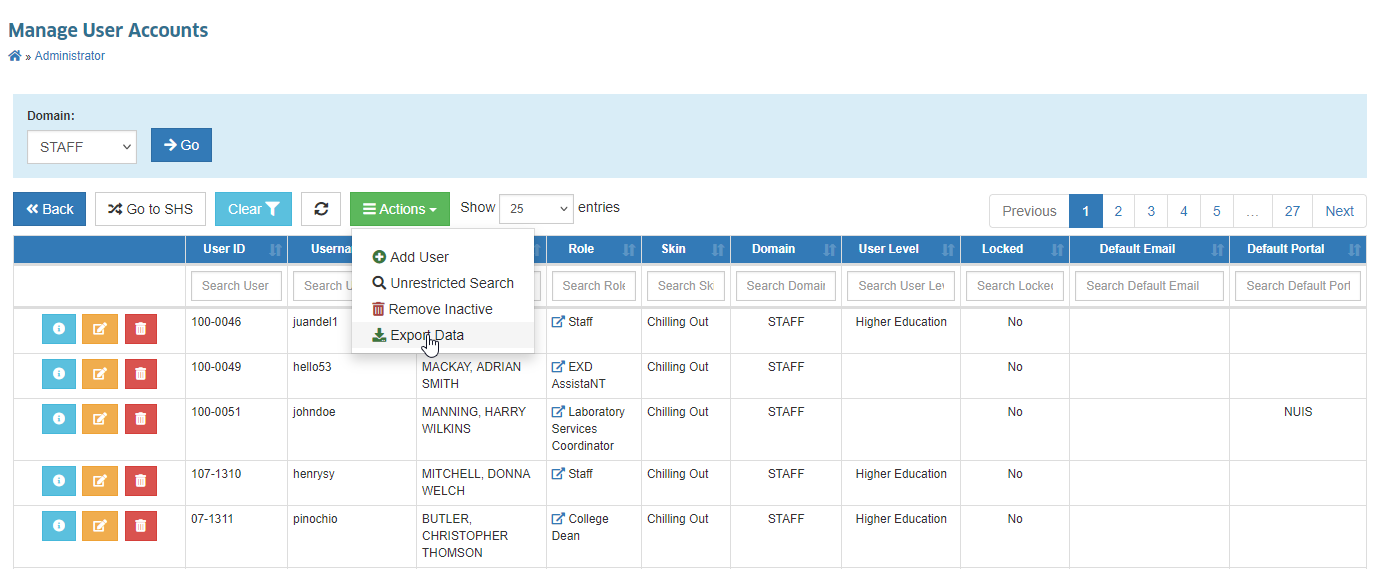
STEP 4. An Excel file containing the list of user accounts and their assigned roles will be downloaded.
For NUIS-SHS users, follow the same steps as in NUIS to download the list of SHS users.
- Multi-Factor Authentication (MFA) Setup Documentation ITSO
Evidence showing that MFA is enabled and configured for applicable systems to enhance security against unauthorized access.
- Login Logs / Audit Trails TSO
Records from servers, firewalls, Student Information Systems (SIS), Learning Management Systems (LMS), ERP platforms, and other applications showing successful and failed login attempts.
- VPN Access Logs (if applicable) TSO
Logs showing remote access activity via Virtual Private Network (VPN), including user, date, time, and originating IP address.
- Inactive/Terminated Account Deactivation Logs ITSO
Documentation proving that accounts belonging to inactive or separated personnel are promptly disabled or removed.
- Biometric/Card Access System Reports ITSO
System-generated logs showing entries and exits from secure areas based on biometric scans or access card usage.
- Visitor Logbooks (Physical Access) ITSO
Records of visitors entering secure facilities, including date, time, name, purpose of visit, and authorizing personnel.
- Evidence of Periodic Access Reviews N/A
Reports or sign-off documents showing that system and facility access rights are reviewed quarterly or annually, with necessary updates made.
IT Asset Inventory Is Maintained and Updated
Maintaining an accurate and up-to-date inventory of IT assets ensures accountability, proper resource allocation, and compliance with audit and regulatory requirements. Documentation must be current and reconciled with physical checks and accounting records. The following supporting documents should be prepared:
- IT Asset Inventory Database/List ITSO
A master list of all IT equipment (e.g., computers, projectors, routers, printers) with details such as asset ID, location, assigned custodian, model, and acquisition date.
- Annual Physical Inventory Reports ITSO
Reports signed by responsible personnel after conducting a physical asset count, reconciled with accounting records to verify accuracy.
- Property Acknowledgment Receipts (PAR) or Inventory Custodian Slips (ICS) ITSO
Official forms acknowledging the assignment of an asset to a specific custodian, signed and dated for accountability.
- Tagging/Labeling Records ITSO
Documentation of serial numbers, asset tags, and photos showing proper labeling of each item for identification purposes.
- Purchase and Disposal Records ITSO Delivery receipts, COA Form 101, retirement forms, and other documentation showing proof of acquisition or disposal of IT assets.
- Inventory Audit Reports ITSO
Reports generated from internal or external inventory audits, highlighting compliance status, discrepancies, and corrective actions taken.
- Software License Records or Tracking Sheets ITSO
Documentation of all licensed software, including proof of purchase, license keys, expiry dates, and declarations for any open-source software used.
- Updated Configuration Management Database (CMDB) (if maintained) ITSO
A central database tracking configuration items, their relationships, and changes. This should reflect the most recent updates for hardware and software assets.
Network Infrastructure Is Documented and Maintained (LAN, WLAN, Servers)
A well-documented and actively maintained network infrastructure ensures reliability, security, and efficient troubleshooting. Proper records and backups help verify compliance and support operational continuity. The following supporting documents should be prepared:
- Updated Network Topology Diagrams (Physical and Logical) ITSO
Visual diagrams showing the structure and connections of network devices, both in physical layout and logical design.
- IP Address Allocation Records (Static/Dynamic) ITSO
Documentation of IP assignments, including static and dynamic allocations, to track usage and avoid conflicts.
- Device Configuration Backups (Routers, Switches, Firewalls) ITSO
Securely stored backup files of network device configurations to allow quick restoration in case of failure or misconfiguration.
- Server Inventory and Specifications TSO
A complete list of all servers, including their roles, operating systems, hardware specifications, and assigned locations.
- Network Maintenance Logs ITSO
Records of scheduled maintenance, upgrades, patches, and any downtime, noting the reason and resolution.
- Change Management Records for Infrastructure Updates N/A
Documentation of approved and implemented network infrastructure changes, ensuring proper authorization and traceability.
- Firewall and IDS/IPS Logs TSO
Logs from firewalls, Intrusion Detection Systems (IDS), and Intrusion Prevention Systems (IPS) showing security events and actions taken.
- Server and Network Monitoring Reports (Uptime/Downtime) TSO
Automated or manual reports tracking network and server availability, with timestamps for outages and recovery.
- Internet Service Provider (ISP) SLA or Contract
The formal agreement with the ISP detailing service levels, uptime guarantees, and escalation procedures.
- Equipment Manuals/Specifications
Manufacturer manuals, datasheets, or technical specifications for network devices and servers for reference and maintenance.
- Incident Reports on Connectivity or Security Incidents
Detailed reports on past network outages or security incidents, including root cause analysis and corrective measures taken.
Data Backup and Recovery Mechanisms Exist
Having robust data backup and recovery processes ensures business continuity and minimizes the impact of data loss. Proper policies, schedules, and test records demonstrate compliance and readiness for emergencies. The following supporting documents should be prepared:
- Data Backup Policy TSO
A formal document detailing the backup process, including frequency, scope, retention schedules, and responsibilities.
- Backup Schedules and Logs (Automated or Manual) TSO
Records showing when backups are performed, whether automated or manual, with details of completion status and any errors encountered.
- Backup Storage Inventory TSO
A list of backup storage locations and devices, including cloud subscriptions, external drives, and offsite storage, with corresponding access records.
- Disaster Recovery Plan (DRP) or Business Continuity Plan (BCP) TSO
Documents outlining procedures for restoring systems and data in case of outages, disasters, or security breaches.
- Backup Restoration Test Reports TSO
Evidence of regular restoration tests conducted to verify that backup data can be successfully recovered and used.
- Data Retention and Disposal Policy ITSO
Guidelines on how long data should be retained, how it should be archived, and the procedures for secure disposal.
- Contracts or Subscriptions with Third-Party Backup Providers (if applicable) ITSO
Agreements or invoices from external backup providers, detailing the scope of services, storage capacity, and service levels.
ITSO Concerns Are Resolved Within the Established Timeframe
Timely resolution of IT Systems Office (ITSO) concerns ensures minimal disruption to operations and maintains user satisfaction. Documentation should show that issues are tracked, resolved, and escalated in accordance with defined service levels. The following supporting documents should be prepared:
- Helpdesk or Ticketing System Logs ITSO
Records from manual or digital systems (e.g., OTRS, Freshdesk, GLPI) showing logged issues and their resolution status.
- Incident Resolution SLAs ITSO
Standard turnaround times for resolving different categories of incidents, formally documented and approved.
- Monthly or Quarterly ITSO Performance Reports ITSO
Summaries of ITSO activities, ticket resolution rates, and adherence to SLAs.
- Ticket Logs (With Timestamps and Resolution Times) ITSO
Detailed logs of issues, including when they were reported, assigned, and resolved.
- Complaint Logbook or Email Trail (With Timestamps) N/A
Physical or digital records of user complaints, including time of submission and the resolution provided.
- Escalation Matrix and Procedure TSO
A defined process for escalating unresolved or critical issues, including contact points and response timelines.
- Root Cause Analysis (RCA) Reports for Major Incidents TSO
Detailed reports identifying the underlying cause of major issues and the corrective measures taken.
- Feedback or Satisfaction Survey Results from End Users ITSO
User feedback collected after issue resolution to measure service quality and identify areas for improvement.
- Audit Logs of System Changes Following Issues ITSO
Records of configuration or system changes made to address reported incidents, providing traceability and accountability.
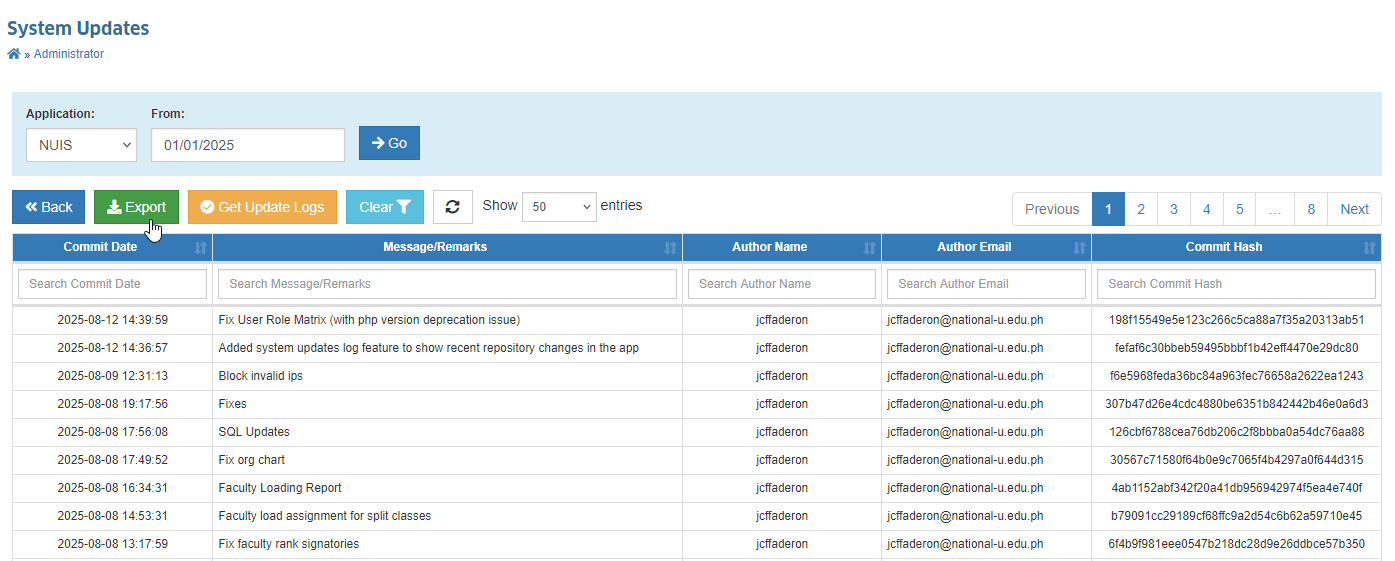
STEP 1. Log in to NUIS using a System Administrator account.
STEP 2. Go to Administrator > System Updates.
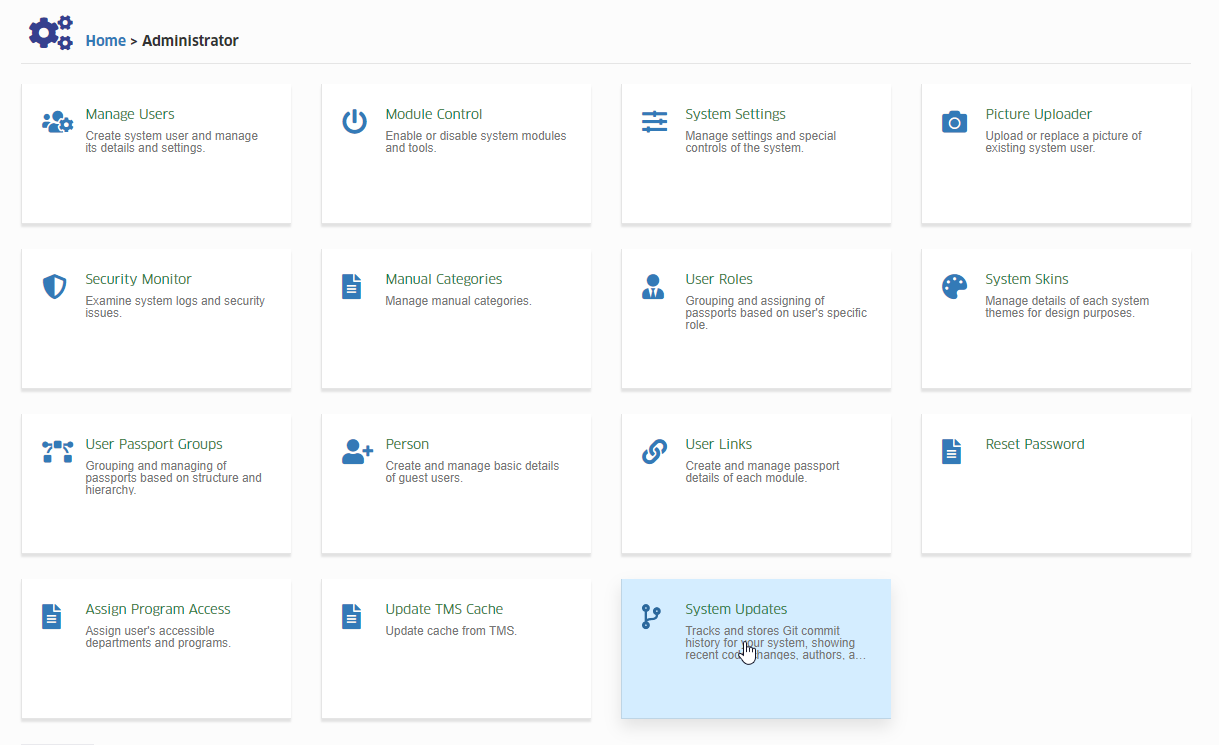
STEP 3. Click Get Update Logs to retrieve the latest updates.
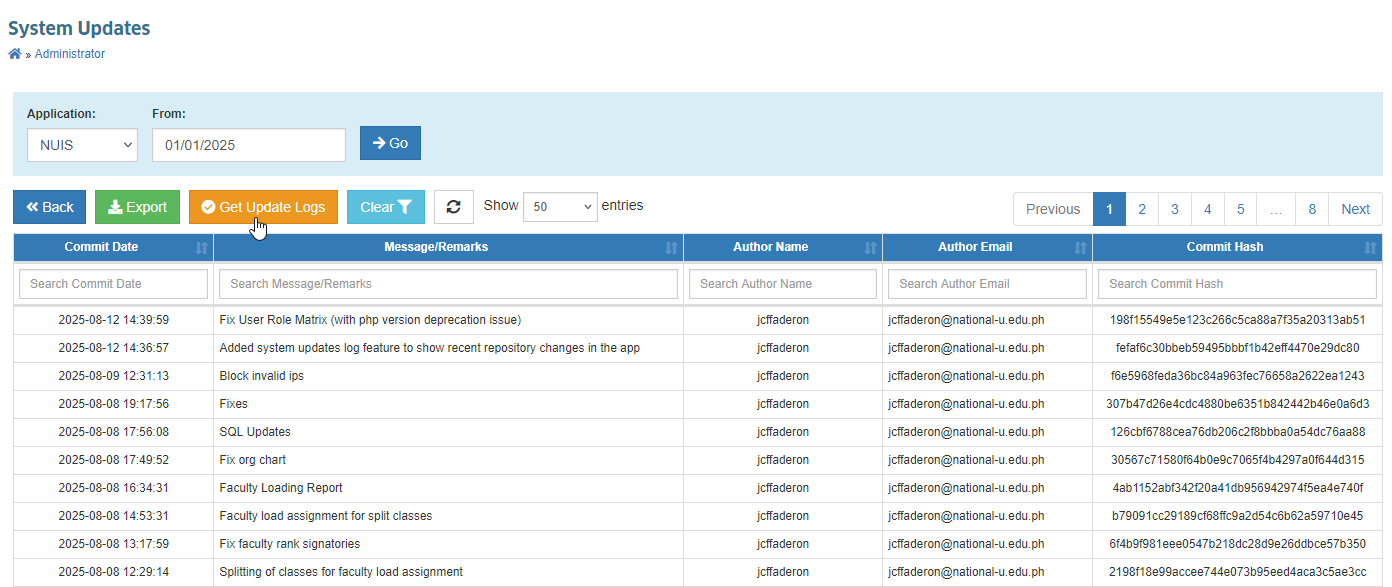
STEP 4. In the filters, select the Application and set the Date From field.
STEP 5. Click the Go button to generate the logs for the specified application and starting date.
STEP 6. Click the Export button to download the list based on the filtered data.