Enrollment List using NCR CHED Template

This module improvement allows the NCR Campuses to generate and extract the Enrollment List following the NCR CHED Template (version 2023).

How to Use the NCR CHED Template
Follow the instructions below how to use this template:
STEP 1. Go to Registrar > Reports > Enrollment Summary > Summary per Year Level module.
STEP 2. Generate the Summary Report.
This report is always cached at least one (1) day after generating the data. To ensure that you will be generating updated report, make sure to Recache the report before generating the list.
STEP 3. Generate the List Report by clicking any data in the Summary Report.
STEP 4. Click the button and select the NCR CHED Template.
Wait for the generated report to be finished.
This template is applicable only to campuses in National Capital Region. Although available in all campus portals, using this document template is unnecessary if not in compliance with your Regional CHED.
Affected Modules
Due to this improvement, the Registrar will be required to complete the Course module specifying the program name and specification.
Update the Course Information by following the guide below:
STEP 1. Go to Registrar > Records Management > Courses module.
STEP 2. If the existing program has a Major or Specialization, click the button.
STEP 3. Specify the Short Course Name and Specialization in the provided fields.
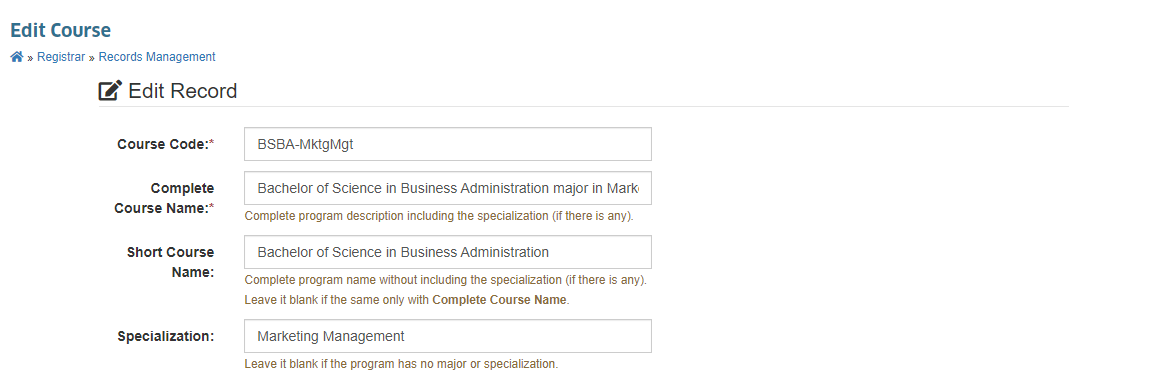
STEP 4. Click button to save changes.