Faculty Ranking Evaluation
The Faculty Ranking Application module enables faculty members to formally apply for a faculty rank in accordance with the university's established criteria. Through this feature, eligible faculty can submit the necessary information and documentation to be considered for ranking under the appropriate track -- Academic or Industry Practitioner.
All applicants are strongly advised to carefully review the Faculty Ranking System Guidelines provided by the Faculty Services Offices (FSO) prior to starting their application. These guidelines outline the qualification criteria, documentation requirements, and procedures for each rank and track. Compliance with the guidelines is essential to ensure a smooth and accurate evaluation process.
Required Permissions
The set of permissions must be assigned to user's role based on their role in the process. Permissions should be assigned by the campus System Administrator.
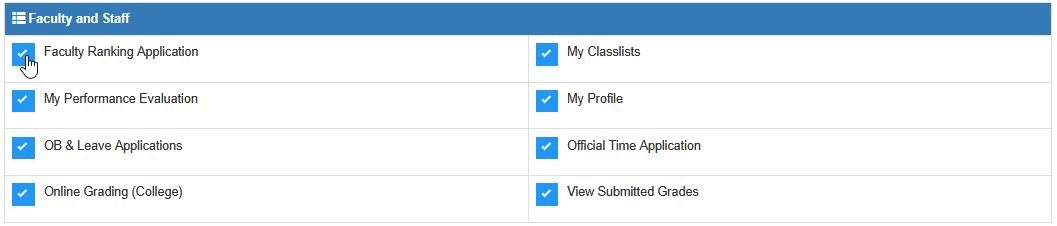
Faculty Members - Add the Faculty Ranking Application permission to faculty member's user role. This permission allows the user to submit faculty ranking application.
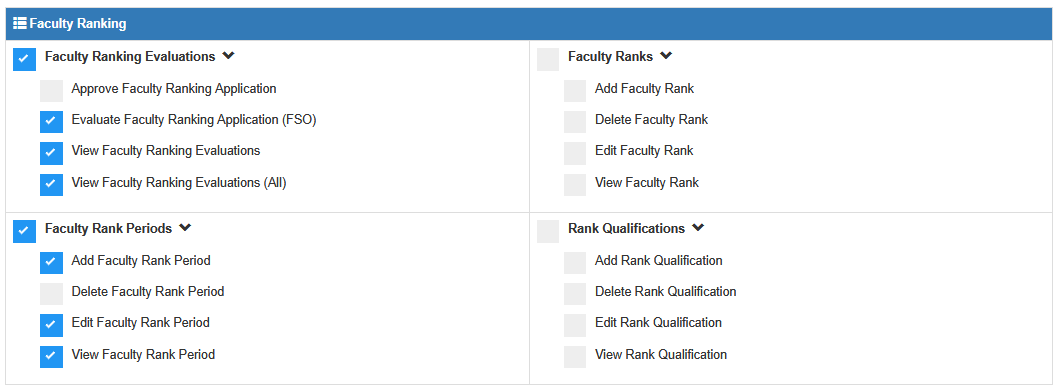
FSO Coordinator - The FSO Coordinator will be responsible for setting up the Faculty Rank Periods. They also serve as the validator and endorser of the applications before these can be approved by the deliberators.
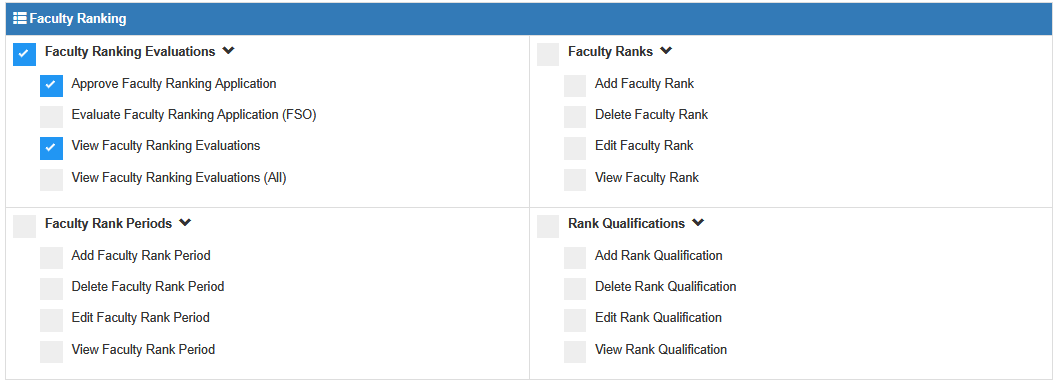
Approvers - The approvers or deliberator of these applications are the faculty member's Program Chair, Deans, Strand Coordinators, Principal, or whoever assigned to process faculty deliberation.
Configurations & Setup
Before the faculty ranking application process begins, the FSO personnel must configure the following modules to ensure a smooth and accurate application flow:
-
Faculty Rank Periods - Set the active period for faculty ranking applications by specifying the academic year, start date and end date. Assign all permissions for this group to campus's FSO personnel.
-
Faculty Rank - Maintain the list of available faculty ranks and assign the corresponding signatories for each rank. Assign all permissions for this group to shared services FSO personnel.
-
Rank Qualifications - Manage the list of required qualifications for ranking. Although this is typically a one-time setup, FSO personnel may add or modify qualification record as needed. Assign all permissions for this group to shared services FSO personnel.
Process Overview
All faculty members who wishes to apply for faculty ranking will undergo the following stages of Faculty Ranking Process.

Stage 1. Submission of Faculty Ranking Application
In this stage, faculty members begin the process of applying for ranking. The application must be completed and submitted with all the required documents before it can be evaluated. This stage includes the following steps:
- Start New Application
Faculty members initiate their application by providing general information such as their Current Track and Current Rank.
- Upload Requirements
Faculty members select the rank they are applying for, which prompts the system to display the list of required documents. Each requirement must be completed, and corresponding documents must be uploaded.
- Submit Application
Once all required fields and documents are completed and uploaded, the application can be submitted.
For more detailed instruction on submitting the faculty ranking application, please visit the Faculty Ranking Application module guide.
Stage 2. Evaluation
This module is used by designated campus FSO personnel to evaluate and endorse faculty ranking applications. The evaluation process is a required step before the application can proceed for deliberation and final approval by the faculty member's superior.
How to Access the Module
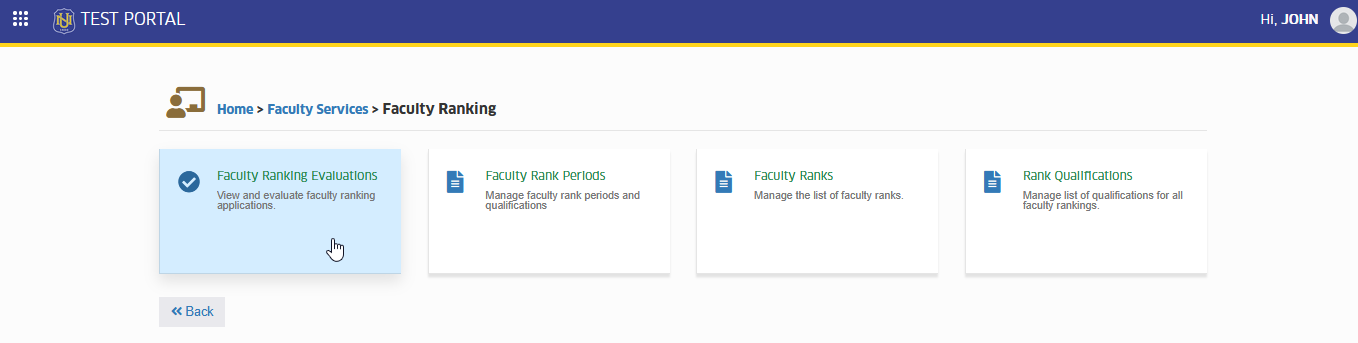
To access the module, make sure you have the Faculty Ranking Evaluations permission. If it doesn’t appear in your portal, request access from your System Administrator.
To access the module go to Faculty Services > Faculty Ranking > Faculty Ranking Evaluations
Click the module tab to redirect to Faculty Ranking Evaluations page.
How to Evaluate Application
This section is intended for campus FSO personnel ONLY. It outlines the steps in evaluating faculty ranking applications before they proceed to the deliberation stage.
FSO personnel are tasked with reviewing submitted applications to ensure that all required information and documents are accurate, complete, and compliant with institutional guidelines. Based on the review, applications may either be returned to the faculty member for revision or endorsed for deliberation by the faculty member's superior.
Only applications that pass the evaluations stage can move forward to the deliberation process.
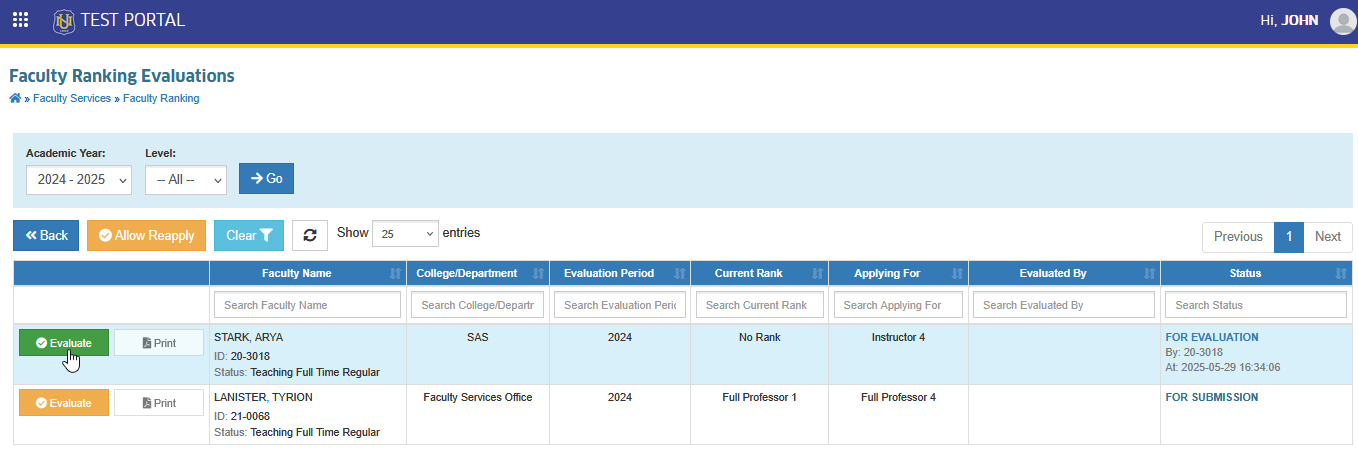
STEP 1. In the Faculty Ranking Evaluations list view page, all submitted applications are displayed. Use the filtering feature to search for the application to be evaluated, then click the corresponding button. This action will redirect to the evaluation page.
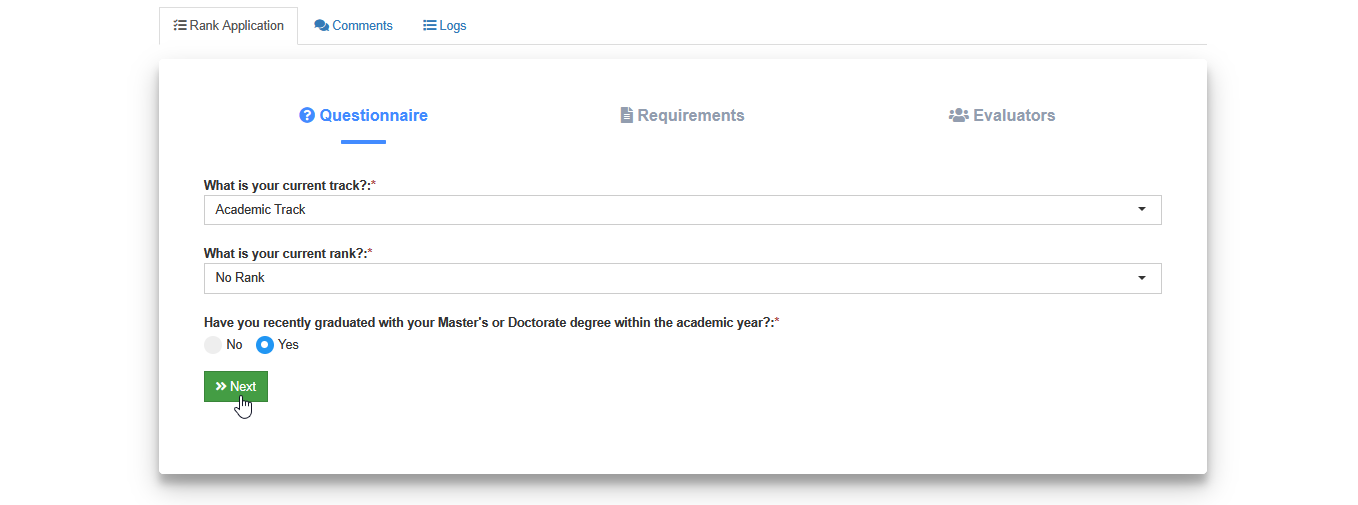
STEP 2. On the evaluation page, go to Rank Application tab. In the Questionaire section, review the faculty member's track and rank. Once done, click the button to proceed to the Requirements section.
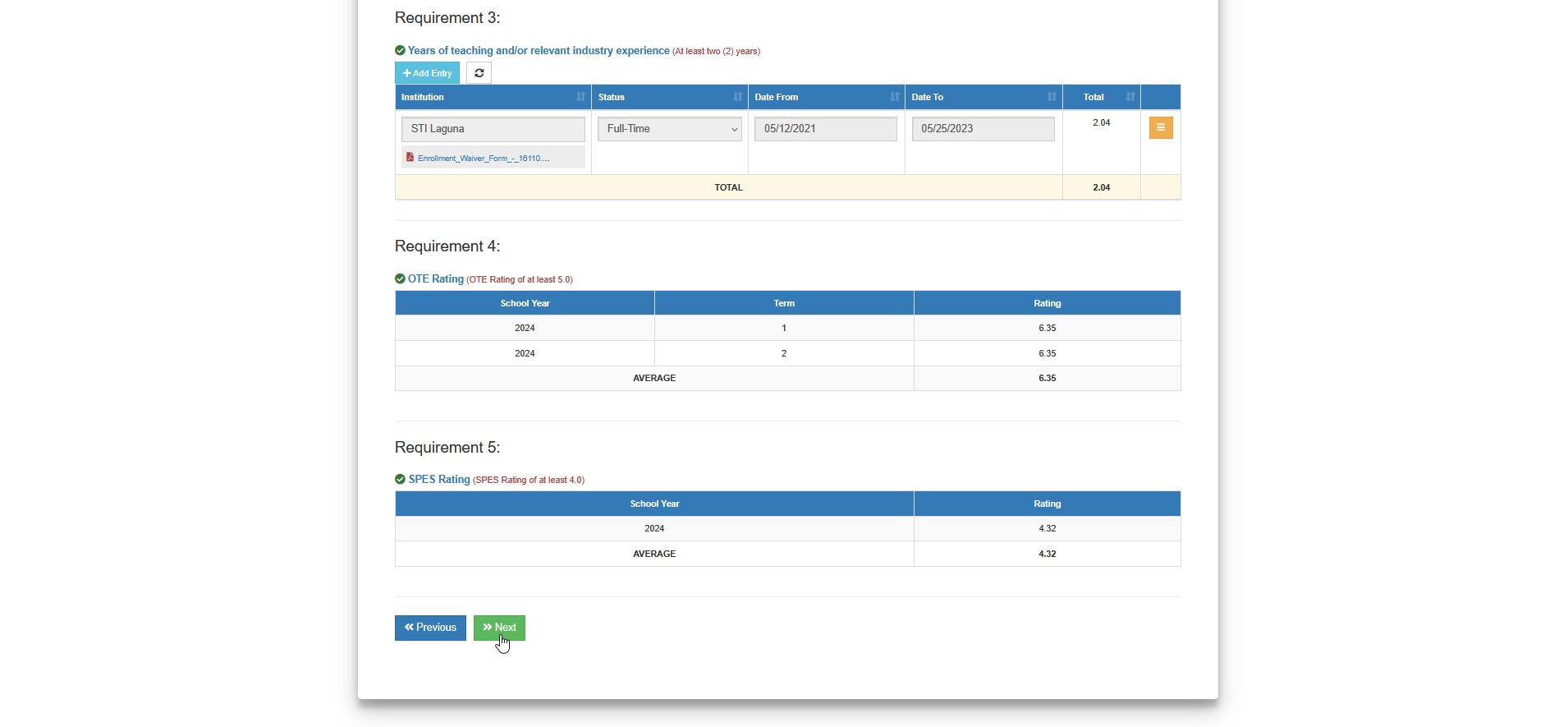
STEP 3. In the Requirements section, review all the entries and validate each uploaded requirements. Once completed, click the button to proceed to the Evaluators section.
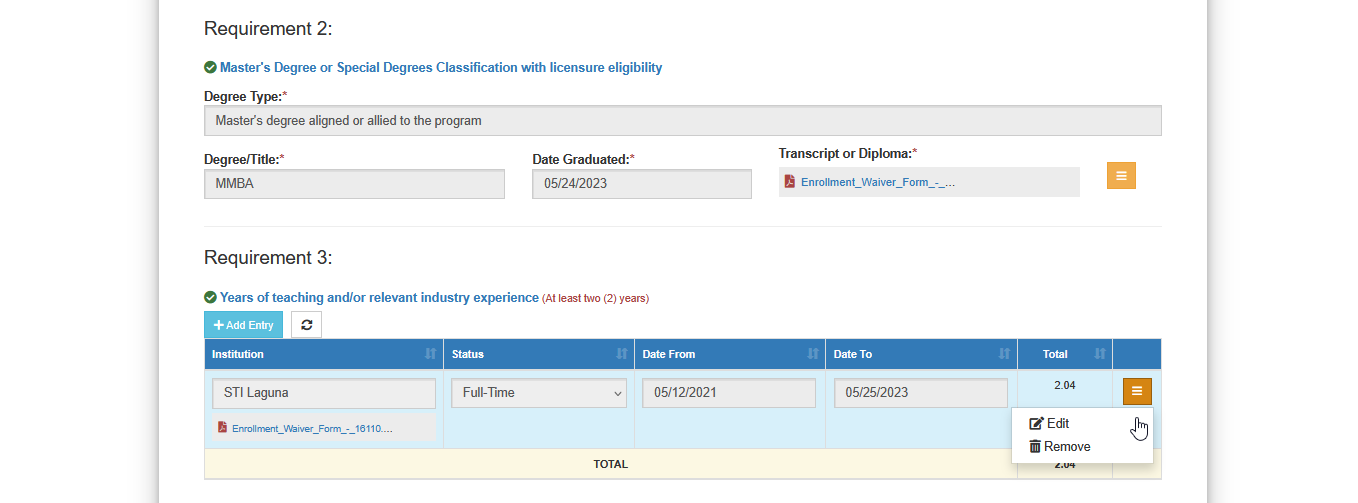
While reviewing the uploaded requirements, FSO personnel may modify or remove invalid entries by clicking the button and selecting appropriate action.
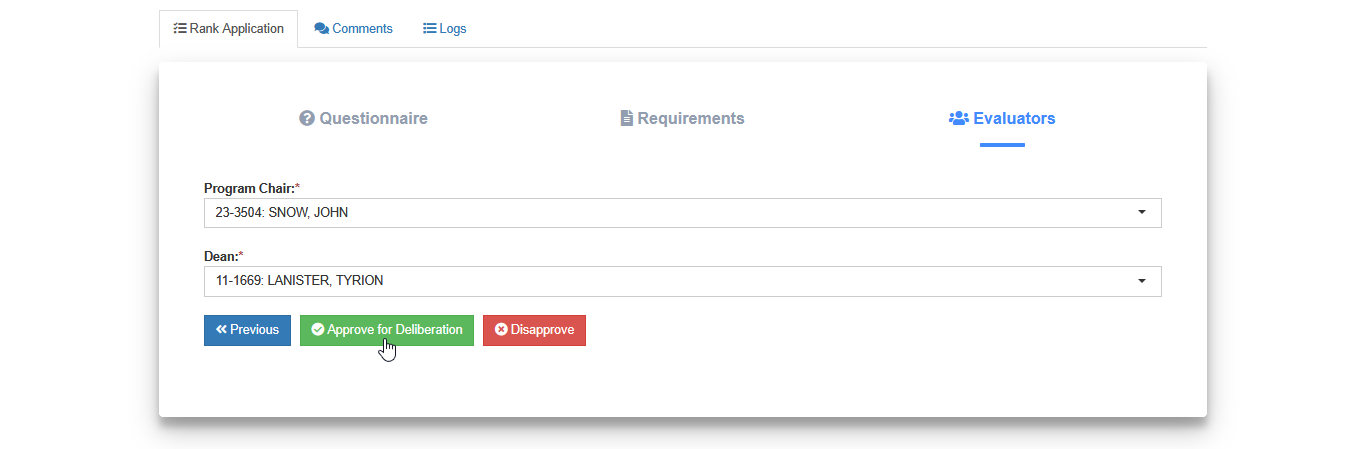
STEP 4. Approve the application under the Evaluators section by clicking the button. This action forwards the application to the deliberators for final review.
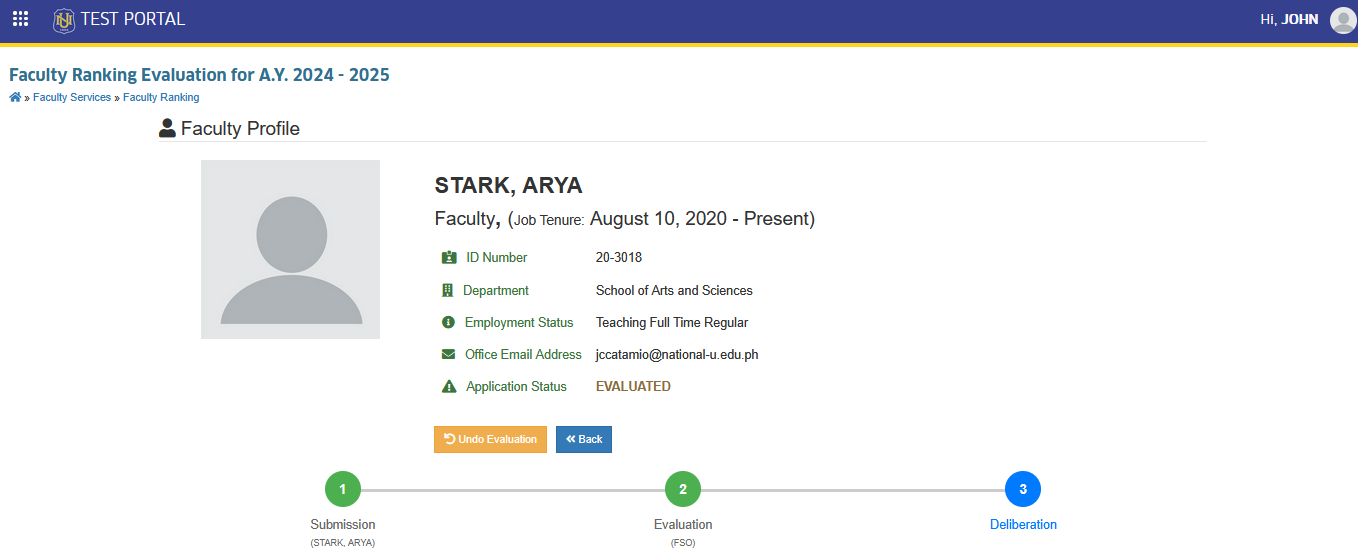
Notice that the Evaluation stage is highlighted in green. This indicates that the application has completed evaluation and is now in the deliberation stage.
-
FSO personnel may use the option if changes or corrections are needed after an application has already been evaluated. This allows the application to be returned to an editable state before final endorsement.
-
FSO personnel can modify or update the assigned deliberators for a faculty ranking application as needed, ensuring that the correct evaluators are set before endorsement for deliberation.
-
FSO personnel have the authority to remove any invalid or incorrect entries and uploaded files during the evaluation process to maintain the accuracy and integrity of the application.
Stage 3. Deliberation
The Deliberation stage occurs after the evaluation process has been completed and the application has been endorsed by the FSO personnel. During this stage, the faculty member's application is reviewed by their assigned deliberators (Program Chair and Deans for College, or Strand Coordinator and Principal for Senior High School).
How to Access the Module
To access the module, make sure you have the Faculty Ranking Evaluations permission. If it doesn’t appear in your portal, request access from your System Administrator.
To access the module go to Faculty Services > Faculty Ranking > Faculty Ranking Evaluations
Click the module tab to redirect to Faculty Ranking Evaluations page.
How to Evaluate a Faculty Ranking Application (Deliberation Stage)
Once an application has been endorsed by the FSO personnel, it becomes available for deliberation. Assigned deliberators must review the faculty member's qualifications and supporting documents before making a decision.
To evaluate for deliberation :
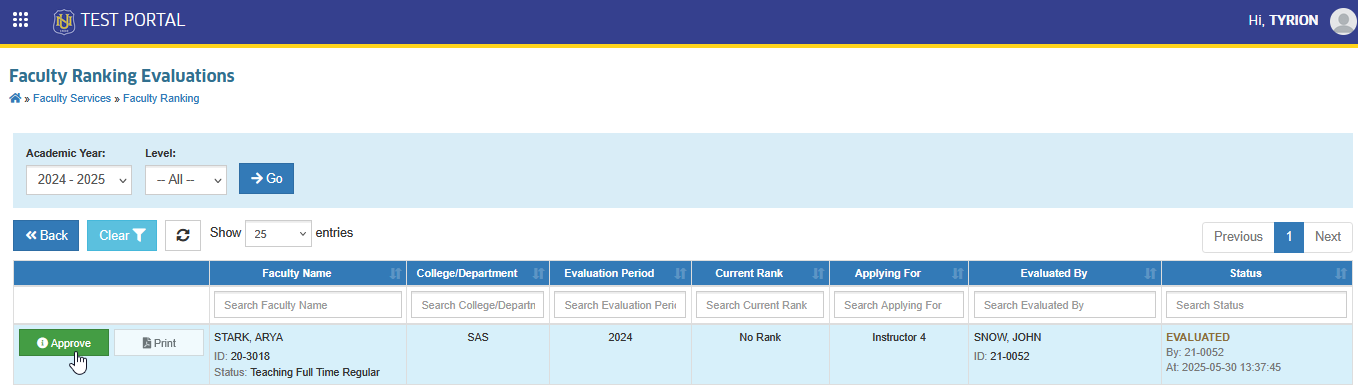
STEP 1. In the Faculty Ranking Evaluations list view page, all applications that have been evaluated by FSO are displayed. Use the filtering feature to search for the application to be evaluated for deliberation, then click the corresponding button. This action will redirect to the evaluation page.
STEP 2. On the evaluation page, go to Rank Application tab. In the Questionaire section, review the faculty member's track and rank. Once done, click the button to proceed to the Requirements section.
STEP 3. In the Requirements section, review all the entries and validate each uploaded requirements. Once completed, click the button to proceed to the Evaluators section.
While reviewing the uploaded requirements, Deliberators may modify or remove invalid entries by clicking the button and selecting appropriate action.
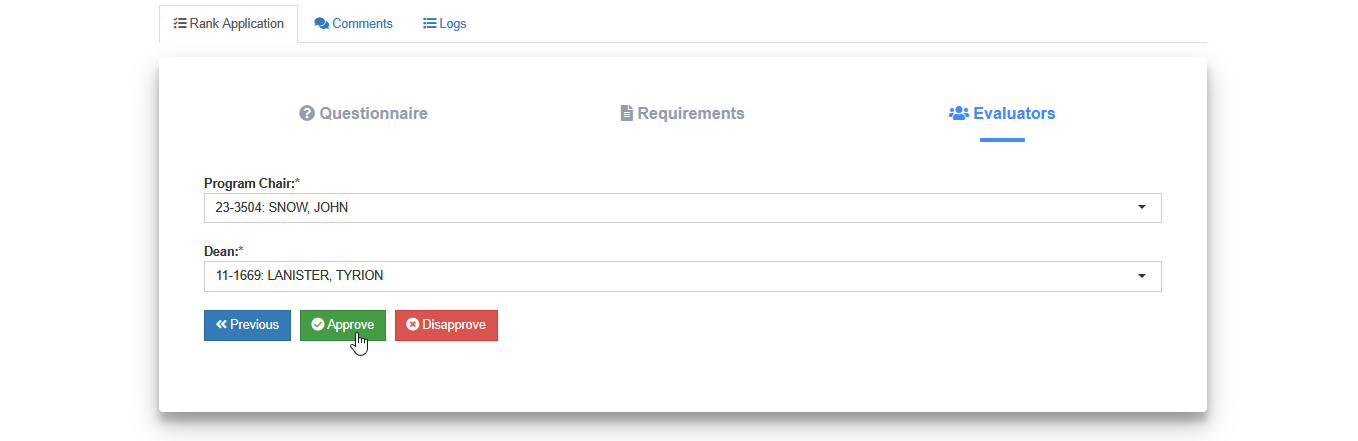
STEP 4. Approve the application under the Evaluators section by clicking the button. This action forwards the application to the next deliberators for final review.
How to Disapprove Application
This option allows the deliberators to formally reject a faculty member's ranking application if it does not meet the required qualifications or if submitted documents are insufficient.
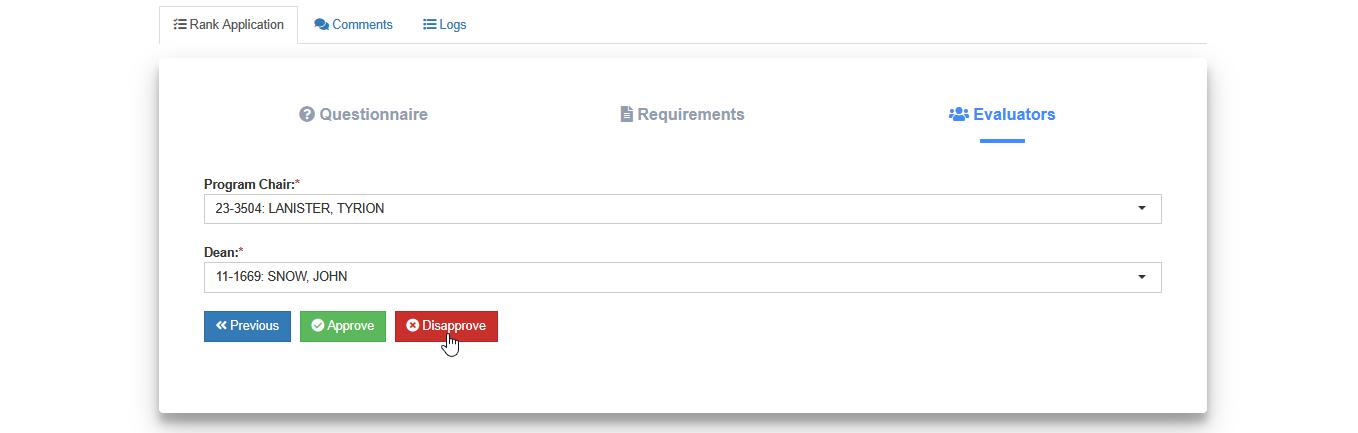
To disapprove an application, follow the STEPS 1-3 on How to evaluate application (Deliberation Stage) and click the button. Provide reason or remarks for disapproval.
How to Allow Faculty to Reapply
This section explains how FSO personnel can allow a faculty member to submit a new application after previous one has been disapproved, or if the faculty member has requested permission to reapply for re-ranking from the FSO.
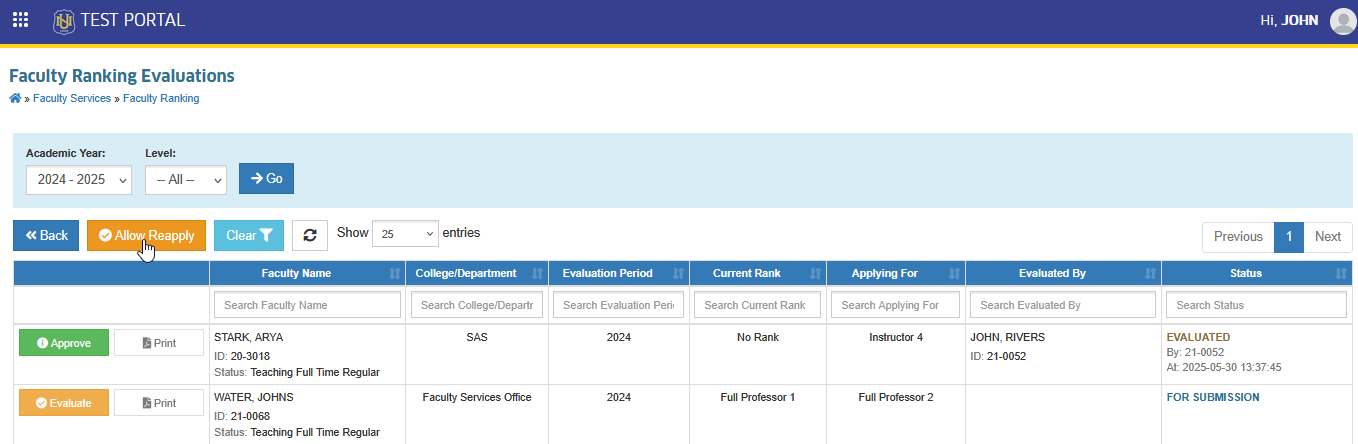
STEP 1. In the Faculty Ranking Evaluations page, locate and click the button.
STEP 2. Enter the employee ID, specify the reason for allowing reapplication, and click the button.
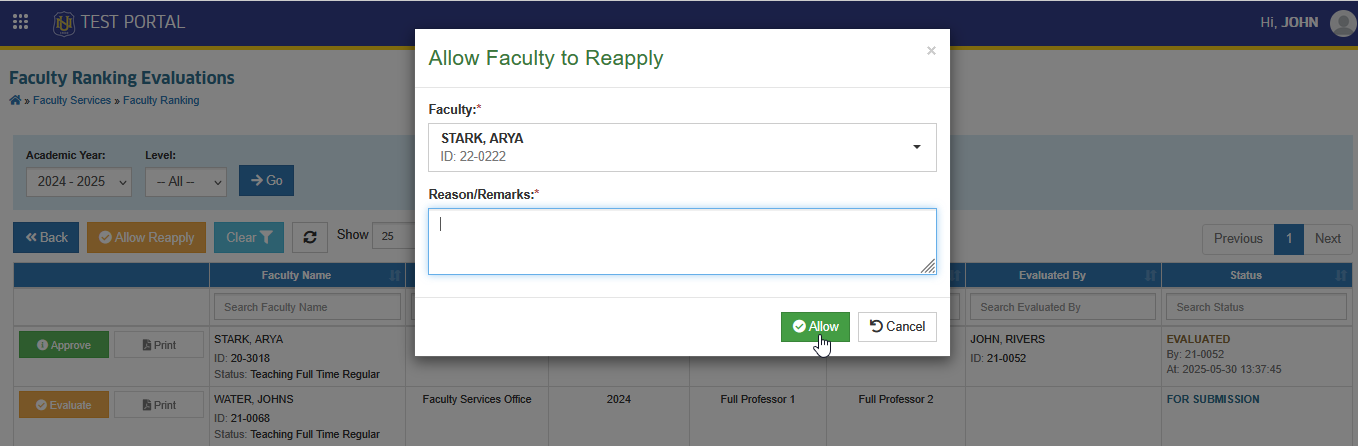
Once the faculty member has been allowed to reapply, they may proceed with submitting a new faculty ranking application.
-
Application will be considered approved if both final deliberators approve it.
-
Deliberators may use the option if changes or corrections are needed after an application has already been evaluated. This allows the application to be returned to an editable state.
-
Use the comment section of the module to follow up with the applicant or to ask questions regarding their submitted requirements.
For more questions or concerns, email us at nu-desk@national-u.edu.ph
-
Faculty Rank periods will be manage by FSO shared personnel.(Change the permission per users)
-
Added a feature where the FSO Shared can delete Faculty Ranking Application. Assign also this permission to campus fso.
-
Faculty Ranks will be manage by campus FSO personnel. Assign the permissions to campus FSO to manage signatories per rank. (Change the permission)
-
FSO shared can reset a deliberated application within the faculty ranking period only.